Support #14384
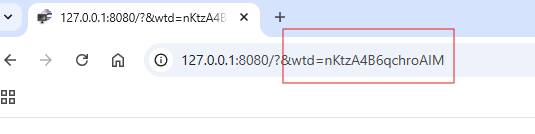
openSession ID in URL
0%
Description
Is there any way to hide the session id in the url although "reload-is-new-session" is set to "false"?
My wt_config.xml looks like follows:
...
Auto
false
false
false
...
I can see that a cookie is set in the browser and the application also does receive the cookie.
The session id always stays in the url unless i set "reload-is-new-session" to "true" but thats not what I want.
I'm using WT 4.12.5 with wthttp connector.
Files

AR Updated by Achim Reutelsterz 6 months ago
It seems my configure option from wt_config.xml doesn't get showed up. So here again:
tracking=Auto
reload-is-new-session=False
session-id-cookie=false
cookie-checks=false
RM Updated by Romain Mardulyn 5 months ago
Hi Achim,
Where is the url you are talking about?
Is it in the logs or in the url bar of the browser?
AR Updated by Achim Reutelsterz 5 months ago
Hi Romain,
I'm talking about the url bar in the browser.
RM Updated by Romain Mardulyn 5 months ago
I do not manage to reproduce your issue.
Are these the only option you changed?
What browser are you using and are you using special options?
Do you have a small test case that reproduces the bug?
AR Updated by Achim Reutelsterz 5 months ago
- File noSessionIdInUrl.png noSessionIdInUrl.png added
- File sessionIdInUrl.png sessionIdInUrl.png added
- File wt_config.xml wt_config.xml added
Hi Romain,
yes, those are the only options I set. All other options are set to their default values. I've attached my wt_config.xml.
I've tested it with several Browsers (Edge, Chrome, Firefox) and no special options are set.
The issue occurs on every app I run, including the wt examples from you.
So maybe it is not a bug but rather a misunderstanding on my side.
Our customer doesn't want to see the session id in the url for security reasons. But setting "reload-is-new-session" to true is not an option for us.
So the question is: Is there any way to get rid of the session id in the url in this case?
RM Updated by Romain Mardulyn 4 months ago
Hi Achim,
After looking into it again, it is indeed not possible to remove the session ID from the URL when "reload-is-new-session" is set to false.
AR Updated by Achim Reutelsterz 4 months ago
Hi Romain,
thanks for the clarification.
WD Updated by Wim Dumon 3 months ago
Achim, the thing is that we have to be able to tell apart two tabs within one browser, and route each to their own session. You can't do that with cookies, since cookies are shared among tabs. I'm not sure if using a different ID than the session ID in the URL would solve your concerns, as I believe the security implications would be the same.
We usually solve this by adding sufficient state to the browser path to ensure we end up at the same page in case of a reload, even when a new session is started.
BR,
Wim.
AR Updated by Achim Reutelsterz 3 months ago
Hi Wim,
ah ok I understand.
We will discuss this with our customer again and I believe they will go along with your reasoning.
Our Software doesn't use different paths beyond the main page. All navigation-related actions simply replace the main widget. So this might actually be a limitation of our current software design.
That's the reason why we can't set "reload-is-new-session" to true.