Bug #3545
closed KD
KD
Problem using Tab Widget (for closable tabs)
0%
Description
Hi,
I'm having troubles using the TabWidget, I can't make my tabs closable... I followed the guide here : http://www.webtoolkit.eu/widgets/navigation/tab-widget
But it doesn't work.
I can't see any close icon on my app, I tried to change the css to make it appear in vain.
Here is a sample of my code :
WContainerWidget *box = new WContainerWidget();
WTabWidget *tabW = new WTabWidget(box);
WMenuItem *tab = tabW->addTab(new WTextArea("Recap"), "General");
WMenuItem *tab1 = tabW->addTab(new WTextArea("Port 1"), "Port 1");
tab1->setCloseable(true);
WMenuItem *tab2 = tabW->addTab(new WTextArea("Port 2"), "Port 2");
tab2->setCloseable(true);
WMenuItem *tab3 = tabW->addTab(new WTextArea("Port 3"), "Port 3");
tab3->setCloseable(true);
tabW->setTabCloseable(1, true);
tabW->setTabCloseable(2, true);
tabW->setTabCloseable(3, true);
return (box);
As you can see I tried two ways to make it closable. None works, no close icon.
Need help.
Thanks !
Files
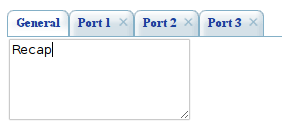
KD Updated by Koen Deforche almost 12 years ago
- File screenshot.png screenshot.png added
- File closable.cpp closable.cpp added
- Status changed from New to Resolved
- Assignee set to Koen Deforche
Hey,
I've put this is an example and tested it. It works as expected for me?
Koen
KD Updated by Koen Deforche almost 12 years ago
- Status changed from Resolved to Closed