Bug #11875
closedWBoxLayout incorrectly calculates the size of scrollable widgets
0%
Description
I expect in my example that the widgets with the same scale factor get the same size. Unfortunately it isn't. The large content view gets more space than a short content view.
But if I set the preferred layout implementation globally to JavaScript and the preferred layout implementation of concrete layout to Flex then it works as expected. This surprised me because the BoxLayout has Flex implementation by default.
That would be a workaround but in one case it doesn't work. If the view with short content (v1 in my example) has a scale factor greater than 0 and the other has none, then the view v1 will not be displayed.
void showLayout()
{
  auto m1 = std::make_shared<Wt::WStandardItemModel>(1, 1);
  auto m2 = std::make_shared<Wt::WStandardItemModel>(10, 1); // The content takes up more than half of the space provided

  auto layout = std::make_unique<Wt::WVBoxLayout>();
  //layout->setPreferredImplementation(Wt::LayoutImplementation::Flex);

  auto v1 = layout->addWidget(std::make_unique<Wt::WTreeView>()/*, 1*/);
  v1->setModel(m1);
  auto v2 = layout->addWidget(std::make_unique<Wt::WTreeView>()/*, 1*/);
  v2->setModel(m2);

  auto c = Wt::WApplication::instance()->root()->addWidget(std::make_unique<Wt::WContainerWidget>());
  c->setLayout(std::move(layout));
  c->resize(200, 200);
}

class Application : public Wt::WApplication
{
public:
  Application(const Wt::WEnvironment& env);
};

Application::Application(const Wt::WEnvironment& env)
  : Wt::WApplication(env)
{
	showLayout();
}

int main(int argc, char **argv)
{
  //Wt::WLayout::setDefaultImplementation(Wt::LayoutImplementation::JavaScript);

  return Wt::WRun(argc, argv, [](const Wt::WEnvironment& env) {
    return std::make_unique<Application>(env);
  });
}
Files
MV Updated by Matthias Van Ceulebroeck about 3 years ago
- Target version set to 4.10.2
MV Updated by Matthias Van Ceulebroeck about 3 years ago
- Status changed from New to InProgress
- Assignee set to Matthias Van Ceulebroeck
MV Updated by Matthias Van Ceulebroeck almost 3 years ago
- Target version changed from 4.10.2 to 4.10.3
MV Updated by Matthias Van Ceulebroeck about 2 years ago
- Target version changed from 4.10.3 to 4.11.1
MV Updated by Matthias Van Ceulebroeck almost 2 years ago
- Target version changed from 4.11.1 to 4.11.2
MV Updated by Matthias Van Ceulebroeck over 1 year ago
- Target version changed from 4.11.2 to 4.11.3
MV Updated by Matthias Van Ceulebroeck over 1 year ago
- Target version changed from 4.11.3 to 4.11.4
MV Updated by Matthias Van Ceulebroeck over 1 year ago
- Target version changed from 4.11.4 to 4.12.1
MV Updated by Matthias Van Ceulebroeck about 1 year ago
- Target version changed from 4.12.1 to 4.12.3
MV Updated by Matthias Van Ceulebroeck about 1 year ago
- Status changed from InProgress to New
- Assignee deleted (
Matthias Van Ceulebroeck)
RM Updated by Romain Mardulyn about 1 year ago
- Status changed from New to InProgress
- Assignee set to Romain Mardulyn
RM Updated by Romain Mardulyn 12 months ago
- Status changed from InProgress to Review
- Assignee deleted (
Romain Mardulyn)
MV Updated by Matthias Van Ceulebroeck 8 months ago
- Assignee set to Matthias Van Ceulebroeck
RM Updated by Romain Mardulyn 7 months ago
- Related to Bug #14302: [Wt 4.12.2] Regression in WHBoxLayout::setResizable and WTreeView triggers endless width/resize loop added
RM Updated by Romain Mardulyn 7 months ago
- Status changed from Review to Implemented @Emweb
- Assignee changed from Matthias Van Ceulebroeck to Romain Mardulyn
RM Updated by Romain Mardulyn 7 months ago
- Status changed from Implemented @Emweb to Closed
AF Updated by Andreas Frolov 7 months ago
The bug hasn't really been fixed yet. This is what the above example looks like in Firefox on my system:
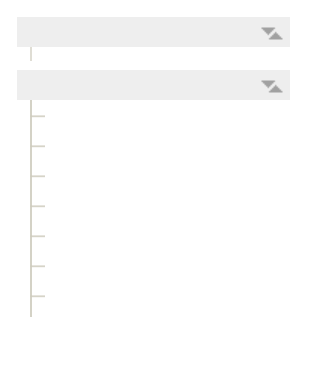
RM Updated by Romain Mardulyn 7 months ago
Hi Andreas,
This is actually expected behavior.
Here is roughly how the stretch factor impacts the size of the widgets:
When space remains after all elements in the layout have reached their preferred size, the stretch factor decides how much of the remaining space is given to each widget.
In this case, the container is too small to fit both widgets. When that happens, the amount of missing space is distributed equally between all widgets with a stretch factor other than 0. If there is still not enough space after that, the same process is applied to widgets with a stretch factor of 0.
AF Updated by Andreas Frolov 7 months ago
Hi Romain,
this behavior should be applied to the views themselves, not their content. If two empty views have the same factor, each should receive 50% of the space. This should be true regardless of the content.
If you change my example above so that the top view gets 10 rows and the bottom one gets 1000 rows, the current implementation allocates only a few pixels to the top view. What's the point of that?
RM Updated by Romain Mardulyn 7 months ago
The behavior does apply to the view; however, by default, the preferred size of a view depends on the size of its content. If you explicitly set both views to the same size (ensuring their preferred sizes are identical), you will achieve the expected result.
I believe there may be a misunderstanding regarding the stretch factor (which is likely why you referred to it as a "scale factor").
The stretch factor does not define the preferred size of a widget. Instead, the preferred size is defined by the widget itself (in this case, the WTreeView). In your example, the size of both views is set to auto, meaning their preferred size is calculated based on their content (which here depends on the number of rows of the view). The layout does not initially attempt to give each widget an equal size or a specific portion of space based on the stretch factor; rather, it attempts to satisfy each widget's preferred size first.
The stretch factor only comes into play when the available space is larger than the combined preferred sizes of all elements in the layout. It determines how much each widget will grow beyond its preferred size to fill that extra space. The only exception is a stretch factor of 0, which also signals the layout to let other widgets shrink before that specific widget is affected, as I explained previously.
AF Updated by Andreas Frolov 7 months ago
You stated that the preferred size of a view depends on the size of its content by default. This implies that this property is configurable. How can I change the preferred size of a widget using the Wt API? I haven't found a way to do this.
Furthermore, it makes little sense for scrollable widgets to display their entire content by default. I've shown you an example where this leads to unusable results.
RM Updated by Romain Mardulyn 7 months ago
The preferred size of a widget can be adjusted using the resize() function. When a widget is placed within a layout, the layout determines its actual dimensions, using the widget's width and height attributes as the preferred size. However, you can still force a widget to maintain a fixed size within a layout by setting its minimum and maximum sizes to the same desired value.
Regarding scrollable widgets, displaying their full content by default is preferable to having a fixed default size when used outside of a layout. This approach is consistent with how other widgets behave; furthermore, achieving this specific behavior would be difficult if the default were handled differently.
AF Updated by Andreas Frolov 7 months ago
For scrollable widgets not within a layout, such behavior can even be useful, as the developer has full control over it. However, this topic is unrelated to the current discussion.
Where does the idea come from that scrollable widgets within a layout should behave the same as regular widgets? Look at the implementation in Qt. The behavior you prefer is possible in Qt, but it's configurable and disabled by default.
And it's not true that it's difficult. WTextArea is a scrollable widget, but it behaves exactly as I expect, at least when the stretch factor is greater than 0.
AF Updated by Andreas Frolov 7 months ago
I misspoke. Scrollable widgets should behave exactly like regular widgets in a layout, since the size of regular widgets is independent of the content.
AF Updated by Andreas Frolov 7 months ago
There are regular widgets that can adjust their height to their content, such as WLabel with wordWrap true. The difference to scrollable widgets is that WLabel offers no other way to display the entire content.